
Download Census GPT – AI‑Powered Census Data Analysis Tool
Overview
Census GPT is a cloud‑native, AI‑driven platform that redefines how researchers, policymakers, journalists, and data‑enthusiasts engage with United States census information. By leveraging advanced natural language processing (NLP) technology, the service lets users type queries in plain English—ranging from simple requests such as “population of Austin, TX” to intricate analyses like “average household income for neighborhoods where crime rates exceed the national median.” The engine interprets the request, pulls the most recent census datasets, and delivers accurate results within seconds, eliminating the tedious manual extraction that traditionally consumes hours or even days of work.
What truly distinguishes Census GPT is its blend of scalability and customizability. Whether a single researcher needs a quick statistic or an entire agency must generate thousands of data points for a longitudinal study, the platform adapts effortlessly. Because it runs entirely in the cloud, there is no requirement for local installations, heavy hardware, or periodic updates—the service continuously refreshes itself with the latest census releases and AI model improvements. Security is built‑in, with encrypted HTTPS connections, two‑factor authentication, and strict data‑privacy policies that guarantee no personally identifiable information is exposed during analysis.
For policymakers, the ability to ask “Which districts have experienced the fastest growth in median age over the past decade?” can directly inform resource allocation, zoning decisions, and social‑service planning. Academics can instantly generate demographic tables for grant proposals, while journalists can verify community‑level statistics before publishing stories. In short, Census GPT streamlines data retrieval, saves valuable time, and democratizes access to detailed census insights for anyone who needs data‑driven answers. The platform also supports multilingual queries, allowing non‑English speakers to interact with U.S. census data using their preferred language, further expanding its global reach.
Overall, Census GPT delivers a secure, fast, and user‑friendly experience that brings powerful census analytics to the fingertips of anyone with an internet connection, whether they are working on Windows, macOS, Linux, Android, or iOS devices.
Key Features
Census GPT packs a comprehensive suite of capabilities designed to turn raw census data into actionable insights without the need for advanced programming skills. Below is a detailed breakdown of the most valuable functionalities that make the tool stand out in a crowded market of data‑analysis applications.
- Natural Language Query Engine: Users type questions in everyday language; the AI translates them into precise database calls, handling synonyms, misspellings, and contextual nuances.
- Real‑Time Data Refresh: The platform automatically syncs with the latest U.S. Census Bureau releases, including the Decennial Census, American Community Survey (ACS), and supplemental datasets, ensuring that every query reflects the most current information.
- Advanced Filtering & Segmentation: Combine multiple criteria (e.g., income > $100k AND crime rate < 5 per 1,000) to drill down to hyper‑specific subsets, with support for logical operators, range sliders, and geographic boundaries.
- Export Options: Results can be downloaded as CSV, Excel, JSON, or GeoJSON, facilitating seamless integration with statistical software, GIS tools, and business intelligence platforms.
- Visualization Toolkit: Generate on‑the‑fly charts, heat maps, and demographic profiles directly within the browser, with options to customize colors, legends, and data labels.
- Collaboration Workspace: Share queries, results, and visualizations via secure links or embed them in external dashboards; role‑based permissions let team members view, comment, or edit analyses.
- Multi‑Device Access: A fully responsive design ensures a consistent experience across Windows, macOS, Linux desktops, as well as Android and iOS mobile browsers.
- Secure Authentication: Two‑factor authentication (2FA), single sign‑on (SSO) integration, and granular access controls protect sensitive research projects.
- Scalable Architecture: Auto‑scaling cloud resources handle anything from a single query to enterprise‑level workloads without performance degradation.
- Comprehensive Documentation & Support: Step‑by‑step guides, video tutorials, a searchable knowledge base, and a 24/7 help desk ensure users can quickly overcome any hurdle.
Each feature is designed with a focus on usability, security, and performance, making Census GPT a versatile tool for both novice users and seasoned data scientists. The combination of AI‑driven querying, real‑time updates, and robust export capabilities positions the platform as a go‑to solution for anyone needing fast, reliable census insights.
Installation & Usage Instructions
Because Census GPT is a cloud‑native web application, there is no traditional installation process. Users simply need a modern web browser (Chrome, Firefox, Edge, Safari) and an internet connection. Follow these detailed steps to get up and running, whether you are an individual analyst or part of a larger organization.
- Create an Account: Visit censusgpt.example.com and click “Sign Up.” Provide a valid email address, create a strong password, and enable two‑factor authentication for enhanced security.
- Verify Your Email: A verification link will be sent to your inbox. Click the link to activate your account and complete the onboarding flow.
- Select a Plan: Census GPT offers a free tier with up to 100 queries per month, as well as paid plans that provide unlimited queries, bulk exports, priority support, and advanced visualizations. Choose the plan that matches your workload.
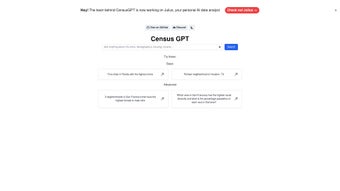
- Explore the Dashboard: After logging in, you’ll see a clean interface featuring a central query window, a sidebar with recent searches, and a “Resources” tab containing documentation, video tutorials, and community forums.
- Enter a Query: Type a question in plain English, such as “Show me the top five cities with the highest median household income in 2022.” The AI parses the request and presents a table of results within seconds.
- Refine Results: Use the filter panel to add additional constraints (e.g., population > 500,000, region = West). The platform updates results in real time, allowing iterative exploration.
- Export or Visualize: Click “Export” to download data in CSV, Excel, JSON, or GeoJSON. Alternatively, select “Create Chart” to generate bar graphs, line charts, or heat maps instantly.
- Collaborate: Share a secure link to the query or invite teammates to a project workspace. Each member can view, comment, and edit the analysis based on assigned permissions.
- Manage Your Account: Access the “Account Settings” page to update billing information, adjust notification preferences, and review usage statistics for the current billing cycle.
- Troubleshoot Common Issues: If a query returns an error, check the syntax suggestions provided by the AI, ensure your filters are logically consistent, and verify that you have not exceeded your monthly query limit.
For organizations that require on‑premise deployment due to regulatory constraints, Census GPT offers a Docker‑based container that can be installed on private servers. The container image is available on Docker Hub, and a step‑by‑step “Enterprise Installation Guide” is provided in the Resources tab. This option ensures that all data processing stays within the organization’s firewall while retaining the full feature set.
Compatible with any device that runs a modern web browser on Windows, macOS, Linux, Android, or iOS.
Overall, the user experience is designed to be frictionless: no downloads, no updates, and a consistent interface across all operating systems, making Census GPT the most convenient way to access U.S. census data securely and efficiently.
Conclusion, Pros & Cons, and FAQ
Census GPT represents a significant advancement in how census data is accessed, analyzed, and shared. By translating natural language queries into powerful data extracts, the platform removes technical barriers and accelerates insight generation for researchers, policymakers, journalists, and anyone who relies on demographic information. The seamless integration of real‑time updates, robust export options, and secure collaboration tools makes it a compelling choice for both individual analysts and large institutions.
Pros
- Instant, natural‑language access to massive census datasets eliminates manual data wrangling.
- Continuous real‑time updates ensure that every query reflects the latest census releases.
- Fully web‑based—no local installation or hardware requirements; works on any modern browser.
- Powerful filtering, export, and visualization capabilities are built directly into the platform.
- Secure authentication, 2FA, and role‑based permissions protect sensitive research projects.
- Scalable cloud architecture supports both single‑user queries and enterprise‑level workloads.
- Comprehensive documentation, video tutorials, and 24/7 support reduce the learning curve.
Cons
- Requires an active internet connection; offline analysis is not possible.
- The free tier limits queries to 100 per month, which may be restrictive for heavy users.
- Advanced enterprise features such as on‑premise deployment and custom data integrations require additional licensing.
- Users unfamiliar with AI‑driven query syntax may experience an initial learning curve, although extensive documentation mitigates this.
If you’re looking to streamline your data workflow, reduce manual spreadsheet labor, and make data‑driven decisions faster, download Census GPT today. Start with the free tier to explore its capabilities, then upgrade to a premium plan for unlimited queries, bulk exports, and priority support. Empower your team with AI‑enhanced census analysis—your next data‑driven breakthrough is just a natural language question away.
Frequently Asked Questions
Is Census GPT free to use?
Census GPT offers a free tier that includes up to 100 queries per month and basic export options. For unlimited queries, advanced visualizations, and priority support, paid subscription plans are available.
What data sources does Census GPT rely on?
The platform pulls directly from the U.S. Census Bureau’s public APIs, including the Decennial Census, American Community Survey (ACS), and other supplemental datasets released by the bureau.
Can I export data for use in GIS software?
Yes. Export formats include CSV, Excel, JSON, and GeoJSON, allowing seamless import into GIS platforms such as ArcGIS, QGIS, or Tableau.
How secure is my data when using Census GPT?
All communications are encrypted via HTTPS. The service also offers two‑factor authentication, role‑based access controls, and complies with major data‑privacy standards (e.g., GDPR, CCPA) to protect user information.
Is there an on‑premise version for organizations with strict data policies?
Yes. Enterprise customers can purchase a Docker‑based container that runs on private infrastructure, ensuring that all data processing stays within the organization’s firewall.



.png)



